

Resume command (/resume)
Section titled “Resume command (/resume)”Browse, search, and resume past conversation threads, or recover your last session instantly from the command line.
Overview
Section titled “Overview”Antigravity CLI allows you to maintain multiple ongoing development threads. The /resume command opens an interactive Session Picker TUI panel to browse and load your history. You can also resume sessions directly from your host terminal using command-line flags.
Interactive session picker
Section titled “Interactive session picker”To open the Session Picker inside the TUI, follow these steps:
- Type
/resume(or aliases/switch,/conversation) in the prompt box. - Press Enter.
/resumeNavigating and searching conversations
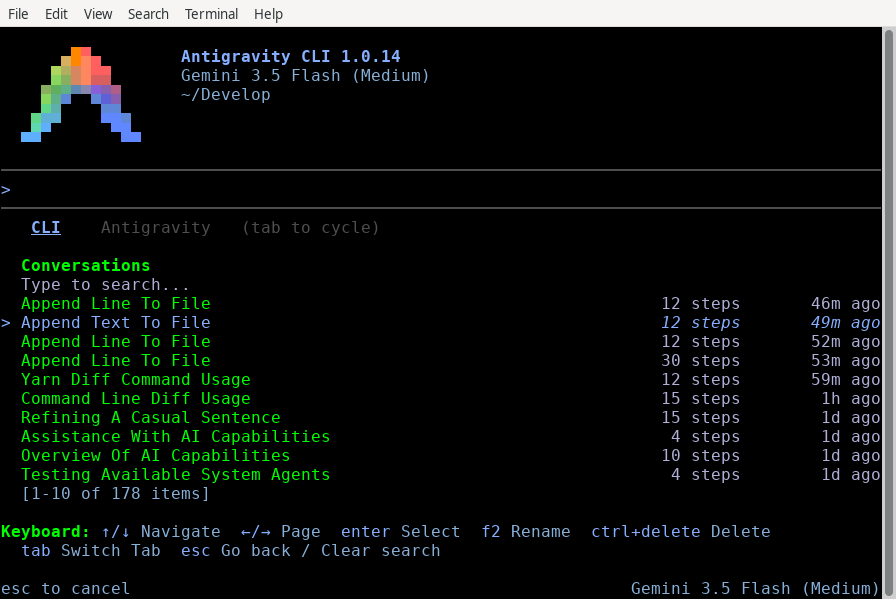
Section titled “Navigating and searching conversations”The Session Picker displays a list of past conversations sorted by recency (newest first). Use the following controls to interact with the list:
- Search: Start typing to instantly filter conversations by their title, preview text, or unique ID.
- Navigate: Use ↑/↓ to scroll through the filtered list.
- Page: Use ←/→ to page backward and forward through older history blocks.
- Select: Highlight your target session and press Enter to load it.
- Exit: Press Esc to close the picker and return to the active prompt.
Renaming a conversation
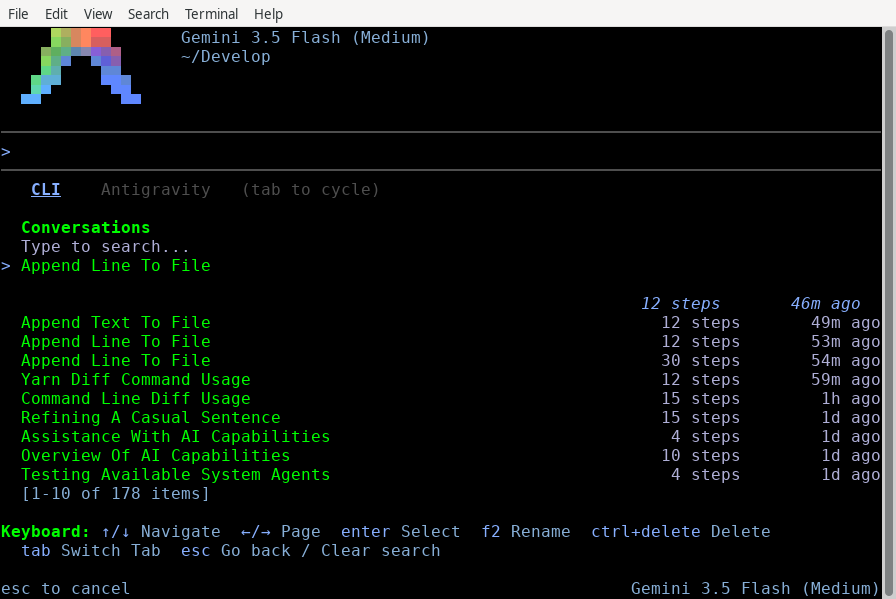
Section titled “Renaming a conversation”To keep your history organized, you can rename conversations directly within the picker:
- Use ↑/↓ to highlight the conversation you want to rename.
- Press F2. An input field opens at the bottom of the panel, prefilled with the current title.
- Type the new name and press Enter to save, or Esc to cancel.
Deleting a conversation
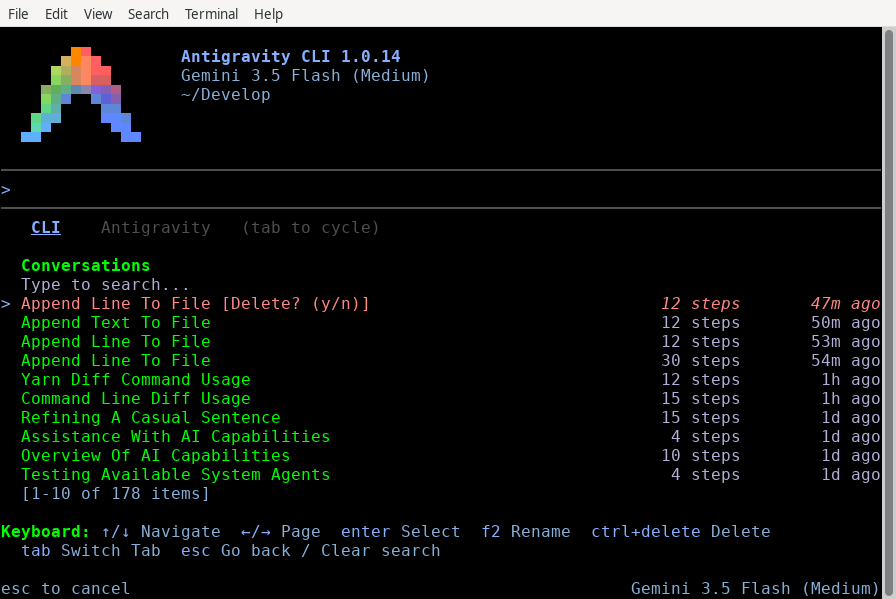
Section titled “Deleting a conversation”To clean up obsolete threads, follow these steps:
- Highlight the target conversation in the list.
- Press Ctrl + Delete. A confirmation prompt appears.
- Press Enter (or Y) to confirm deletion, or Esc (or N) to cancel.
Importing from the Antigravity App
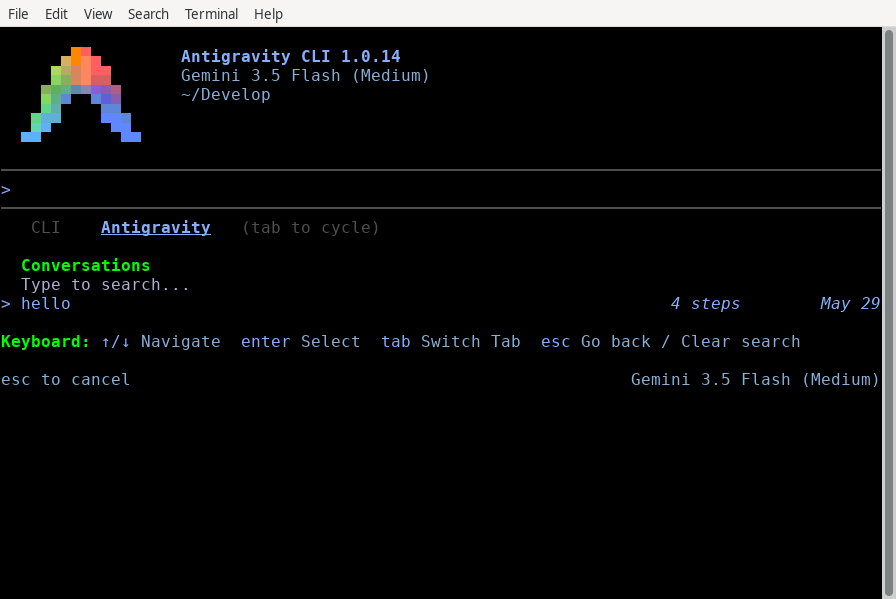
Section titled “Importing from the Antigravity App”You can import and resume active threads initiated in the Antigravity App:
- With the Session Picker open, press Tab to switch from the CLI tab to the Antigravity tab.
- Highlight the desktop conversation you want to import.
- Press Enter. A confirmation prompt
[Import this? (y/n)]appears. - Press Enter (or Y) to confirm. The CLI clones the history, context, and tool trajectories into your terminal session.
Command-line shortcuts
Section titled “Command-line shortcuts”You can bypass the TUI picker and resume sessions directly when launching agy from your host shell.
Quick resume last session (-c / --continue)
Section titled “Quick resume last session (-c / --continue)”To instantly resume the single most recent conversation associated with your active workspace, run the following command:
agy -c(Alternative: agy --continue)
Resume specific session (--conversation)
Section titled “Resume specific session (--conversation)”To load a specific conversation directly by its unique ID, run the following command:
agy --conversation <conversation-id>Under the hood: the session cache
Section titled “Under the hood: the session cache”When you use the -c / --continue flag, the CLI resolves the target session using a local workspace-keyed cache.
The cache file
Section titled “The cache file”The session cache file has the following properties:
- Location:
~/.gemini/antigravity-cli/cache/last_conversations.json - Format: A JSON map associating absolute workspace directory paths with their most recently active conversation ID:
{
    "/usr/local/google/home/username/Develop/my-project": "a1b2c3d4-e5f6-7890-abcd-ef1234567890",
    "/usr/local/google/home/username/Develop/another-repo": "f9e8d7c6-b5a4-3210-fedc-ba9876543210"
}
Resolution workflow
Section titled “Resolution workflow”The CLI resolves the session in the following sequence:
- Launch: You run
agy -cfrom/path/to/workspace. - Lookup: The CLI reads
last_conversations.jsonand looks up the key/path/to/workspace. - Verification: If an ID is found, the CLI queries the backend to verify the conversation still exists.
- Load: Loads the appropriate session:
- If verified, it loads the session.
- If the conversation was deleted or the key is missing, it starts a fresh session for that workspace.
See also
Section titled “See also”Explore the following guides to learn more about managing sessions and settings:
- Managing conversations: Learn about workspace scoping and branching with
/fork. - CLI reference: View all available slash commands and default keybindings.
- Settings, rendering, and keybindings: Configure rendering modes and customize keyboard shortcuts.